




Almost every website you visit today reacts to what you do the moment you do it. A menu opens without reloading the page. A form flags a weak password before you hit submit. A price updates as you drag a slider. That responsiveness almost always comes from one language: JavaScript. It sits underneath a huge share of the modern web, and yet most people who rely on it every day couldn’t say exactly what it is, how it differs from TypeScript, or how to switch it off if they ever needed to.
This guide covers all of that: what JavaScript actually is and where it came from, what it gets used for outside the browser, how it compares to TypeScript, and the part most explainers skip entirely, which is the exact steps to enable or disable JavaScript in Chrome, Firefox, Edge, and on Android and iPhone.
What Is JavaScript?
JavaScript is a programming language built to run inside web browsers, though it has since spread well beyond them. Brendan Eich wrote the first version at Netscape in 1995, in around ten days, under the working name Mocha. It was renamed LiveScript, then JavaScript, largely as a marketing decision tied to Sun Microsystems’ Java at the time, despite the two languages sharing little beyond a name.
The language itself is standardized as ECMAScript, and browser vendors update their engines against that spec on a roughly yearly release cycle. ES2015, usually called ES6, is the version most developers treat as the real turning point. It introduced let and const, arrow functions, template literals, and promises, all of which are now treated as baseline JavaScript rather than modern additions.
Every major browser runs JavaScript through its own engine: Chrome and Edge use V8, Firefox uses SpiderMonkey, and Safari uses JavaScriptCore. None of these engines compile JavaScript ahead of time the way a language like C does. They parse and execute it on the fly, with just-in-time compilation kicking in for code that runs repeatedly, which is part of why a script written for one browser usually, though not always, behaves the same way in another. JavaScript also runs on a single thread, handling anything that takes time, such as a network request, through an event loop rather than true parallel execution.
What Is JavaScript Used For?
Its original job was small: validate a form, swap an image on hover, show or hide a menu. That job hasn’t gone away, but the list around it has grown considerably.
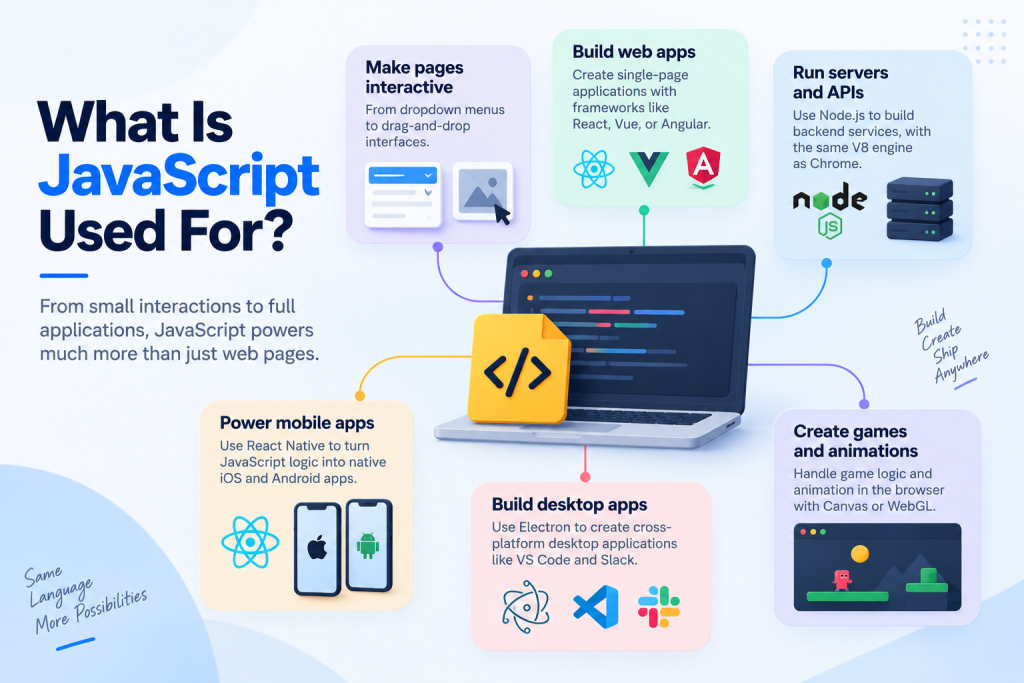
- Making pages interactive without reloading them, from dropdown menus to drag-and-drop interfaces
- Building single-page applications with frameworks such as React, Vue, or Angular
- Running servers and APIs through Node.js, which uses the same V8 engine that powers Chrome
- Powering mobile apps through React Native, which turns JavaScript logic into native iOS and Android components
- Building desktop applications with Electron, the framework behind tools like Visual Studio Code and Slack
- Handling basic game logic and animation directly in the browser through the Canvas or WebGL APIs
Not every project needs all of this, and a lot of production JavaScript is still closer to that original small job: a bit of interactivity layered on top of a page that’s otherwise rendered on the server.
JavaScript vs. TypeScript: What’s the Difference?
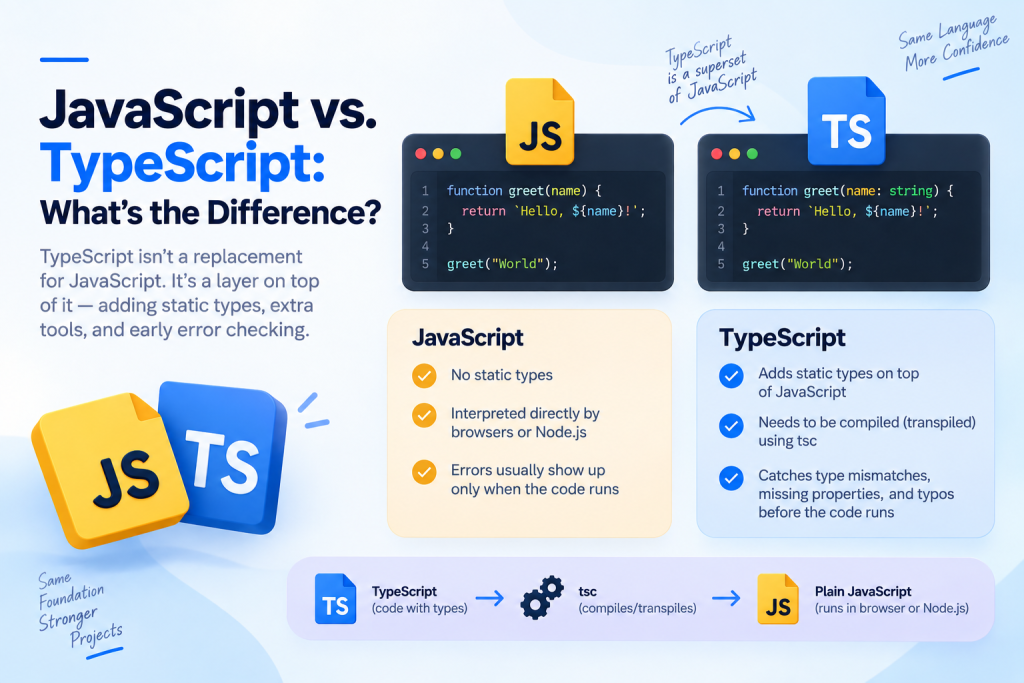
TypeScript is not a replacement for JavaScript. It’s a layer on top of it. Microsoft released TypeScript in 2012, built as a strict superset: every valid JavaScript file is already valid TypeScript, but TypeScript adds static types on top, which plain JavaScript doesn’t have.
The practical difference shows up before the code ever runs. JavaScript is interpreted directly by the browser or by Node, so a typo in a variable name usually only surfaces when that specific line executes, sometimes in production. TypeScript is compiled, or more precisely transpiled, into plain JavaScript first using a tool called tsc. That compilation step is where TypeScript catches type mismatches, missing properties, and a fair number of typos, before the code ever reaches a browser.
That safety net comes at a cost. TypeScript needs a build step that plain JavaScript doesn’t, and writing types across a large codebase takes real time up front. For a five-line script, that overhead usually isn’t worth it. For a codebase several developers touch over years, it tends to pay for itself, though opinions genuinely differ on exactly where that line sits.
How to Enable or Disable JavaScript in Desktop Browsers
JavaScript is switched on by default in every major browser, so most people never touch this setting. It’s worth knowing where it lives anyway, whether you’re troubleshooting a broken page, locking down a shared computer, or just curious.
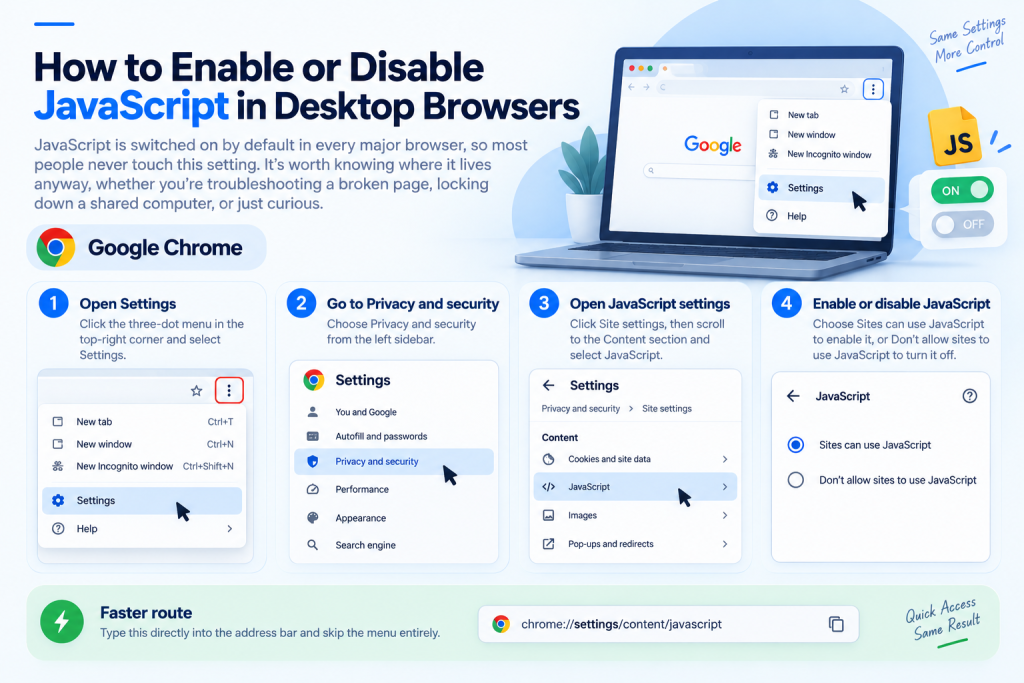
Google Chrome
- Click the three-dot menu in the top-right corner and select Settings.
- Choose Privacy and security from the left sidebar.
- Click Site settings, then scroll to the Content section and select JavaScript.
- Choose Sites can use JavaScript to enable it, or Don’t allow sites to use JavaScript to turn it off.
A faster route: type chrome://settings/content/javascript directly into the address bar and skip the menu entirely.
Mozilla Firefox
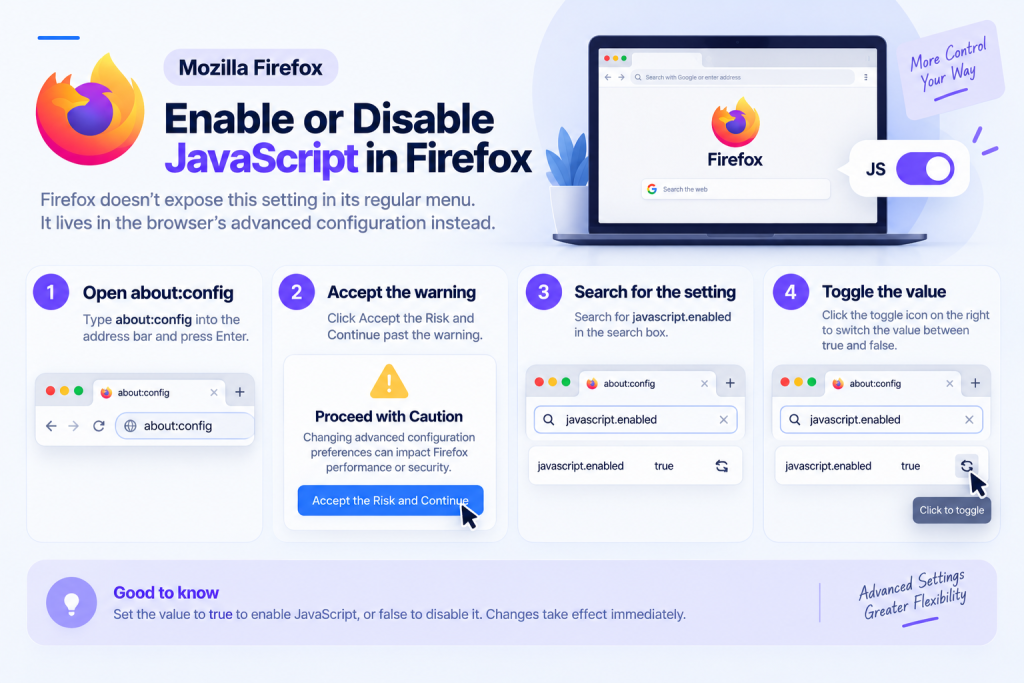
Firefox doesn’t expose this setting in its regular menu. It lives in the browser’s advanced configuration instead.
- Type about:config into the address bar and press Enter.
- Click Accept the Risk and Continue past the warning.
- Search for javascript.enabled in the search box.
- Click the toggle icon on the right to switch the value between true and false.
Microsoft Edge
- Click the three-dot menu and select Settings.
- Go to Cookies and site permissions.
- Scroll to All permissions and click JavaScript.
- Select Allowed (recommended) to enable it, or Blocked to disable it.
How to Enable or Disable JavaScript on Mobile
Android
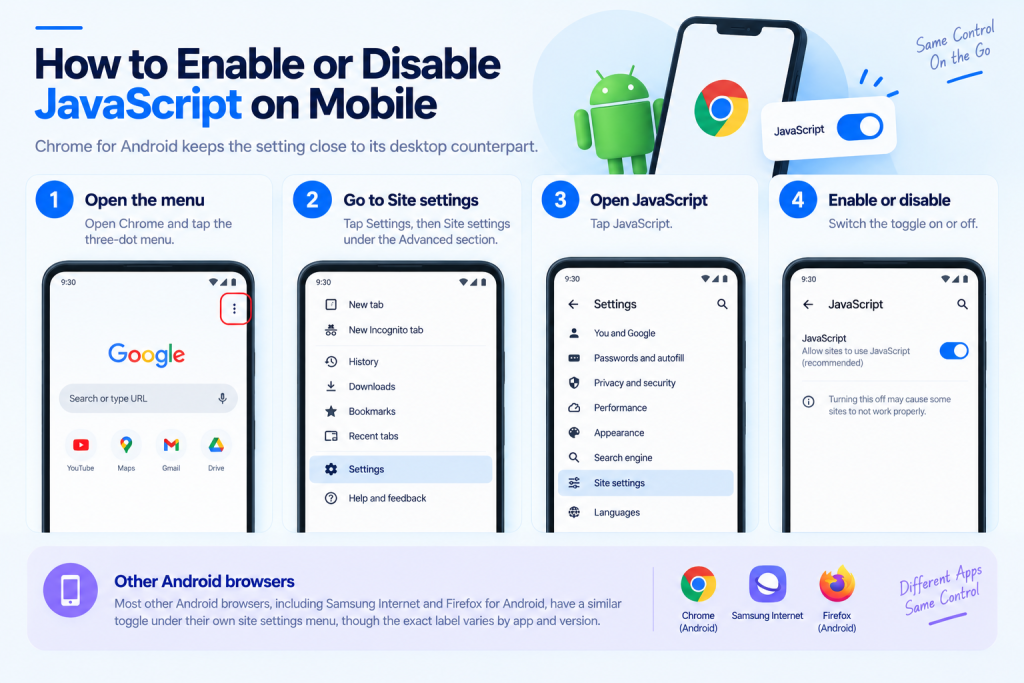
Chrome for Android keeps the setting close to its desktop counterpart.
- Open Chrome and tap the three-dot menu.
- Tap Settings, then Site settings under the Advanced section.
- Tap JavaScript and switch the toggle on or off.
Most other Android browsers, including Samsung Internet and Firefox for Android, bury a similar toggle somewhere under their own site settings menu, though the exact label varies by app and version.
iPhone
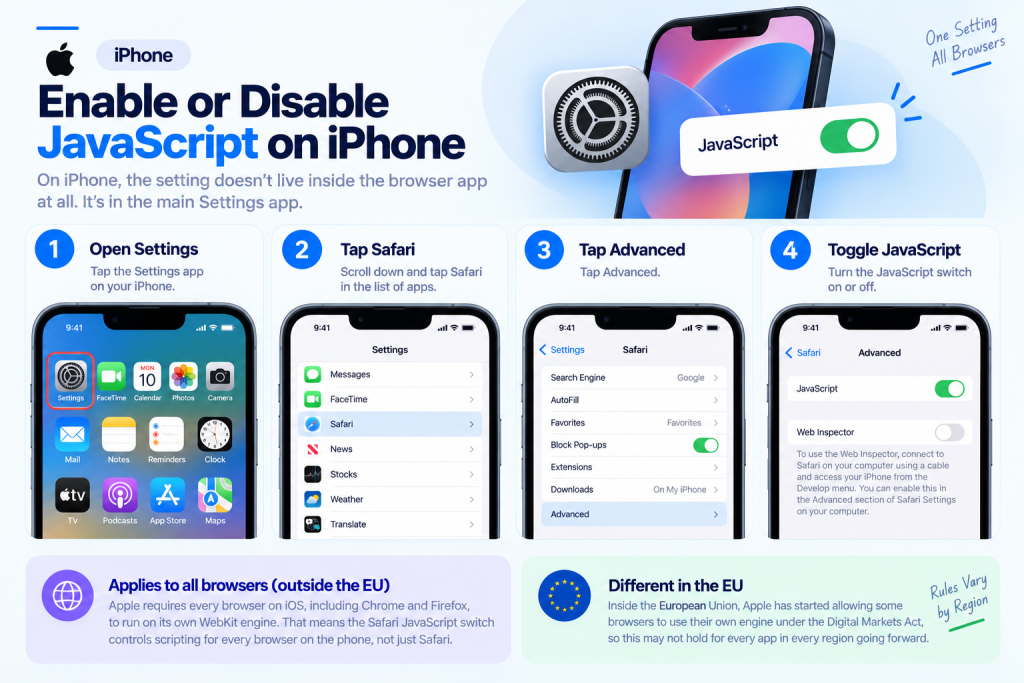
On iPhone, the setting doesn’t live inside the browser app at all.
- Open the Settings app.
- Scroll down and tap Safari.
- Tap Advanced.
- Toggle JavaScript on or off.
This is worth knowing because it applies more broadly than it looks. Outside the European Union, Apple still requires every browser on iOS, including Chrome and Firefox, to run on its own WebKit engine rather than their usual one. In practice, that means the Safari JavaScript switch controls scripting for every browser on the phone, not just Safari itself. Inside the EU, Apple has started allowing some browsers to use their own engine under the Digital Markets Act, so this may not hold for every app in every region going forward.
A few genuine reasons come up for turning JavaScript off on purpose: testing how a page behaves for accessibility tools, checking whether a site’s core content survives without scripting, or a workplace policy that disables it on managed machines by default. For everyday browsing, leaving it on is almost always the right call. Most of the modern web assumes it’s there.
Frequently Asked Questions
Does disabling JavaScript make browsing safer?
It removes one category of attack surface, since a page can’t run scripts it was never allowed to run. It also breaks a large share of the modern web, so most people find the trade-off isn’t worth it outside specific, security-sensitive situations.
Why do some sites still work with JavaScript turned off?
Sites built with server-side rendering send fully formed HTML on every request, so the core content loads regardless. What usually breaks first is anything interactive layered on top, such as comment forms, live search, or infinite scroll.
Is JavaScript the same thing as Java?
No, beyond the name they share very little. Java is a separate, compiled language mostly used for backend systems and Android apps. The naming overlap dates back to a 1995 marketing decision and has confused people ever since.
Do I need to know JavaScript before learning TypeScript?
Most people learn JavaScript first, since TypeScript’s extra features make more sense once you’ve felt the problems they solve. Starting with TypeScript directly is possible, though a fair number of tutorials still assume JavaScript basics going in.
Will enabling JavaScript slow down my browser?
Rarely in any way you’d notice. Modern engines run JavaScript quickly, and the setting itself has no performance cost when left on. A specific page with poorly written scripts can still feel slow, but that’s a problem with that page, not with JavaScript being enabled.
Can a website tell if I’ve disabled JavaScript?
Yes. Developers can check for this directly and often show a message through a noscript tag asking visitors to turn it back on. Some sites instead fall back quietly to a simpler version of the page without saying anything at all.
Explore JavaScript Libraries Next
Once JavaScript itself makes sense, most developers stop writing everything from raw syntax and start reaching for a library that already solves the common problems. Our guide to JavaScript libraries walks through the major options, what each one is actually good at, and where they tend to overlap.